
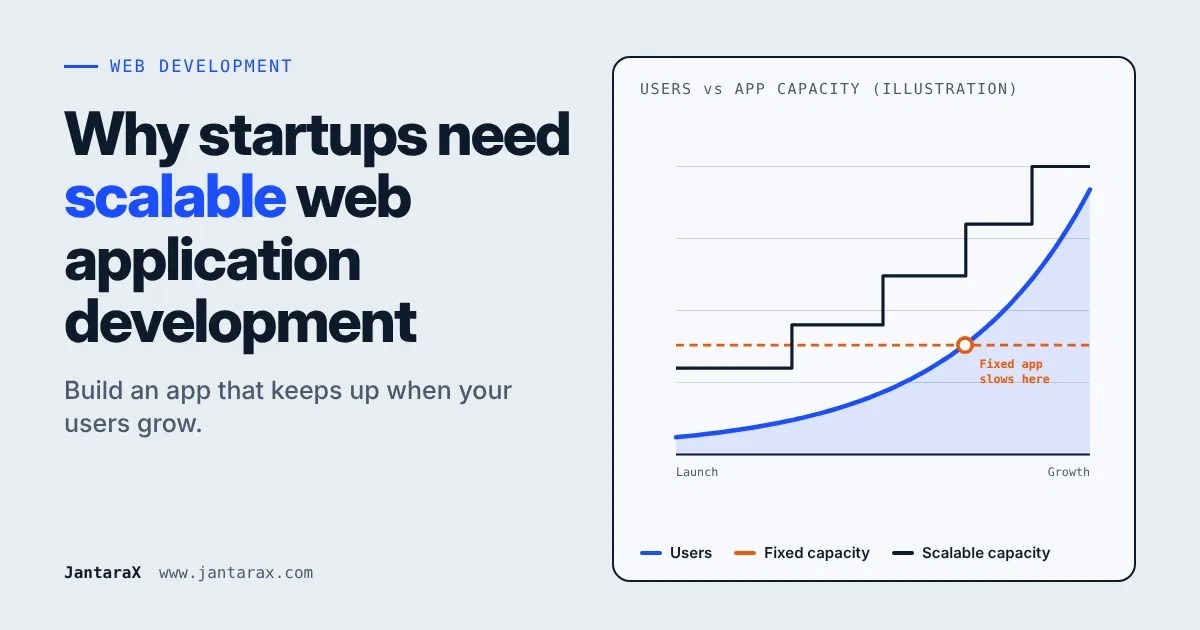
This is why scalable web application development matters. A scalable web app is built to grow with your business. In this guide, you will learn what it means, why startups need it, how to build one, which tools to use, and how to plan the cost. We use simple words, so every reader can follow.
Why web applications matter for modern startups Most startups today run on a web application. It can be your product, your customer portal, your booking system or your internal tool. People open it on their phone or computer without installing anything. That makes it a fast way to reach customers.
How growth increases traffic and demand When your startup does well, more people visit. A good news article, a social media post or a new customer can bring a sudden jump in users. Your app must be ready for that day.
Why plan for scalability from the start Fixing a slow app later is hard and costly. Planning early costs less and saves you from a painful rebuild. You do not need to build everything at once. You only need to make smart choices from day one.
What Is Scalable Web Application Development?
Understanding web application scalability Scalability means your app can handle more users, more data and more work without slowing down or breaking. Think of a shop. A small shop works fine for 10 customers. If 500 people walk in, you need more space, more staff and a better system. A scalable app is like a shop that can grow its space when needed.
How scalable web applications work A scalable app is built in a flexible way. Its parts can grow on their own. If more people use the app, you can add more computing power, split the work across more servers, and speed up the database. The app keeps running smoothly while this happens.
Scalable web applications vs traditional web applications
Traditional web application | Scalable web application | |
|---|---|---|
Handling more users | Slows down or crashes | Adds power as users grow |
Design | Built for today's needs only | Built for today and tomorrow |
Updates | Changes can break other parts | Parts can change one at a time |
Cost over time | Cheap at first, costly to fix later | Planned well, steadier over time |
Downtime risk | Higher | Lower |
A traditional app can be a good choice for a small, fixed tool. But if you expect to grow, a scalable design is the safer path.
Why Startups Need Scalable Web Application Development
Handle increasing website traffic and user growth A startup can go from 100 users to 10,000 users faster than you think. A scalable app grows with this traffic, so you do not lose users on your best day.
Improve website speed and performance People do not wait for slow pages. A scalable app is built to stay fast even when many people use it at the same time. A fast app also helps your search ranking and keeps users happy.
Reduce long-term development and maintenance costs A rebuild is expensive. When you plan for growth early, you avoid big rewrites later. Small, steady upgrades cost less than one large emergency fix.
Support business expansion and new features Your startup will change. You may add new products, new payment options or new reports. A flexible app lets you add these without breaking what already works.
Deliver a better user experience Users like apps that load fast and work every time. A good experience brings people back and makes them tell others.
Improve application reliability and availability If your app goes down, you lose trust and sales. A scalable design spreads the work, so one problem does not stop everything. Your app stays available more of the time.
Key Features of a Scalable Web Application
Flexible and scalable architecture Architecture is the plan of how the app is built. A good plan splits the app into clear parts, such as the screens, the logic and the data. Each part can grow or change on its own.
Cloud-based infrastructure Cloud servers let you add or remove power when you need it. You pay for what you use, and you do not need to buy your own machines. Learn more about our cloud hosting service.
Database optimization and management The database stores your users, orders and files. A well-planned database finds data fast, even when it grows very large.
API integration and microservices An API lets your app talk to other tools, like payments or email. Microservices split a big app into small services that work together. This makes it easier to grow one part without touching the rest. Microservices are not needed for every startup, so choose them only when the app is big enough to need them.
Strong security and data protection More users means more data to protect. A scalable app uses safe logins, protected data and regular updates, so growth does not open new risks.
Automated testing and deployment Automated tests check the app each time you change it. Automated deployment puts new updates live safely. Together they help your team ship changes faster, with fewer bugs.
Types of Web Application Scalability
Vertical scaling vs horizontal scaling
Vertical scaling | Horizontal scaling | |
|---|---|---|
What it means | Make one server stronger | Add more servers |
Simple example | A bigger engine in the same car | More cars on the road |
Good for | Early stage, small apps | Growing apps with many users |
Limit | A single server can only grow so much | Can keep growing by adding more |
Risk | If it fails, the app stops | One server can fail while others keep working |
Most startups begin with vertical scaling because it is simple. As traffic grows, they move to horizontal scaling.
Database scaling for growing applications As data grows, the database can slow down. Common ways to help include adding indexes so searches are faster, copying data to extra servers for reading, and splitting very large data into smaller parts. Your team should choose the method that fits your data.
Cloud scalability for startups With the cloud, you can grow in minutes instead of weeks. Many cloud tools can add power on their own when traffic goes up, and lower it when traffic goes down. This keeps costs fair for a startup.
Choosing the right scaling approach Ask three simple questions:
How many users do we expect in the next 12 months?
What part of the app will be used the most?
How fast can our budget grow?
Start simple. Add more power only when your numbers show you need it.
How to Build a Scalable Web Application for a Startup
Step 1: Define business goals and technical requirements Write down what the app must do and who will use it. List the key actions, such as sign up, pay and download. Then note how many users you expect. Clear goals keep the project on track.
Step 2: Choose the right technology stack A technology stack is the set of tools used to build the app. Pick tools that are proven, well supported and easy to hire for. Do not choose a tool only because it is new.
Step 3: Start with a minimum viable product A minimum viable product (MVP) is the first simple version with only the key features. It lets you test your idea with real users fast. Build it on a base that can grow later.
Step 4: Design a flexible application architecture Keep the parts of the app separate. Keep the screens, the logic and the data apart, so each can change without breaking the others.
Step 5: Optimize database performance Design tables clearly, add indexes for common searches, and avoid saving the same data in many places.
Step 6: Implement cloud hosting and load balancing A load balancer shares incoming visitors across many servers, so no single server gets too busy. Use cloud hosting that can grow when you need it.
Step 7: Test performance before launch Test how the app behaves when many users arrive at once. Fix slow pages and weak spots before real customers find them.
Step 8: Monitor application performance after launch Watch speed, errors and server use every day. Alerts tell you when something goes wrong. Ongoing maintenance and support helps keep the app healthy as it grows.
Need help building? Our team offers web development services that start with your workflow and grow with your business.
Best Technologies for Scalable Web Application Development
There is no single best tool. The right choice depends on your product, your team and your goals. Here are common, well-supported choices.
Frontend technologies for responsive web applications The frontend is what users see and click. Popular choices include React and Next.js. They help you build fast, responsive screens that work well on phones and computers. Next.js can also help with page speed and search visibility.
Backend frameworks for scalable applications The backend runs the logic behind the screen. Node.js is a popular choice because it handles many requests at once and uses the same language as the frontend. Other common choices include Python and Java frameworks.
Cloud platforms for growing startups AWS is one widely used cloud platform. Others include Google Cloud and Microsoft Azure. They offer servers, storage, databases and tools that grow with your traffic.
Database technologies for handling large data volumes Two common types are:
Relational databases, such as PostgreSQL. They keep data in neat tables and are great for accounts, payments and orders.
Document databases, such as MongoDB. They store flexible data and suit apps whose data shape changes often.
Tools like Docker also help by packing the app so it runs the same way on every server.
How to choose the right technology stack
Ask this | Why it matters |
|---|---|
What does my product need to do? | Different tools suit different products |
How big can it grow? | Some tools handle growth more easily |
Can I find developers for it? | Popular tools are easier to hire for |
How safe and well supported is it? | Active tools get updates and fixes |
What does it cost to run? | Hosting and tools add up over time |
A good development partner will explain these choices in simple words and match them to your goals.
Common Scalability Challenges Startups Should Avoid
Choosing technology without planning for growth A tool that works for 100 users may struggle with 100,000. Think about where you want to be in two years, not only today.
Ignoring website speed and performance Slow pages cost you users and sales. Check speed early and often, not only when people complain.
Using poor database structures Messy tables and repeated data make the app slower as it grows. Plan your data clearly from the start.
Overlooking security and data privacy A fast-growing app is a bigger target. Protect logins and user data, and follow the data rules that apply to your business.
Building unnecessary features too early More features mean more cost and more bugs. Build the features users need first, and add the rest when they ask for them.
Failing to monitor application performance If you cannot see a problem, you cannot fix it. Use monitoring and alerts, so you know about issues before your users do.
How Much Does Scalable Web Application Development Cost?
The honest answer is: it depends. There is no fixed price, because every app is different. Here is what changes the cost.
Factors that affect web application development costs
Number and size of features. More features take more time.
Design needs. Simple screens cost less than custom, detailed design.
Integrations. Connecting payments, email or other systems adds work.
Security needs. Apps with sensitive data need more care.
Team size and time. A bigger team or a longer project adds cost.
Technology choices. Some tools take longer to set up.
MVP development vs full-scale application development
MVP | Full-scale application | |
|---|---|---|
Goal | Test your idea fast | Serve many users with a full feature set |
Features | Only the key ones | Many features and extras |
Time | Shorter | Longer |
Cost | Lower to start | Higher overall |
Best for | Early-stage startups | Startups with proven demand |
Most startups save money by starting with an MVP and building on a base that can grow.
Cloud hosting and ongoing maintenance costs The cost does not end at launch. You will also pay for cloud hosting, backups, updates, security checks and support. Plan for these from the start so they do not surprise you.
How startups can manage their development budget
Start with an MVP and grow from real user feedback.
Rank features as must-have, nice-to-have and later.
Use proven tools instead of building everything from scratch.
Ask for a clear plan with phases, so you can pay and review step by step.
Keep a small buffer for changes.
Want a clear plan for your idea? Book a free consultation and we will review your needs with you.